
Homunculus: Difference between revisions
No edit summary |
No edit summary |
||
| Line 253: | Line 253: | ||
When in doubt, you can restart your game client to troubleshoot the AI. Although the restart is not required to reload the AI, it does not hurt. The <code>/hoai</code> setting is persistent and survives the restart; the standby mode is reset upon restart; homunculus behavior settings are read from the AI files and are not affected by the game client restarts. | When in doubt, you can restart your game client to troubleshoot the AI. Although the restart is not required to reload the AI, it does not hurt. The <code>/hoai</code> setting is persistent and survives the restart; the standby mode is reset upon restart; homunculus behavior settings are read from the AI files and are not affected by the game client restarts. | ||
Revision as of 18:04, 28 July 2026
💬Homunculus Infomation
Homunculi are the special companions of Alchemist classes, created to assist their master in battle.
They have their own stats, skills and levels and can evolve after becoming loyal, and mutate to their S form after reaching level 99, gaining new skills and upgrading their level cap to 250.
What is Homunculus and why is it so important?
- Homunculus is a special pet that can assist you in many ways: Tanking, Buffing, Dealing damage.
- It will decide your play style depend on chosen Homunculus.
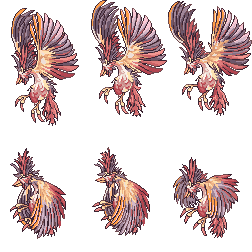
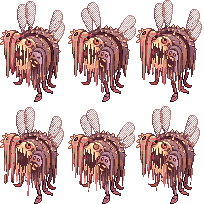
➰Base Homunculus
| Homunculus | Amistr | Lif | Filir | Vanilmirth | ||||
|---|---|---|---|---|---|---|---|---|
| Base Form | 
|

|

|

|

|

|

|

|
| Evolution Form | 
|

|

|

|

|
|

|
|
| Role | Tank | Support | Physical Damage Dealer | Magical Damage Dealer | ||||
| Food |  Zargon (912) Zargon (912)
|
 Pet Food (537) Pet Food (537)
|
 Garlet (910) Garlet (910)
|
 Scell (911) Scell (911)
| ||||
| Skills |
|
|
|
| ||||
💦How to create a Homunculus?
- Step 1: Get 1 Embryo (7142) (you can either buy or make 1 through Pharmacy (Prepare Potion))
- Step 2: Use Call Homunculus to create a Homunculus consuming 1 Embryo (7142) .
- Got the Homun you want? You're done creating Homunculus.
- Didn't got the Homun you want? Open Homun status table by Alt+R , click Delete, re-do Step 2.
💫How to Evolve my Homunculus?
- Step 1: Make your Homunculus Intimacy become Loyal and Level 99.
- Step 2: Obtain a Stone of Sage (12040) then use it. Done !
- After Evolution, your Homunculus will get its power significantly increased.
🧡How to make my Homunculus Loyal?
You have 2 ways:
- Method 1: Just turn on auto feed and AFK or go farming, Homunculus isn't easy to die as before, so low level area shouldn't be a problem. But the uptime of Homun is only 30 minutes, so make sure to have it called back every 30 minutes.
- Method 2: Using Homunculus Supplement (100371) to increase Homunculus's intimacy directly by using it. Each pill gives 10 points of intimacy, so 90 pieces is need to make it Loyal instant from the start.
- Your Homun become Loyal when Intimacy reaches 911 which can be checked by Alt+R and
@hominfo - Note : your Homun Hunger bar won't decrease if it isn't summoned.
- Your Homun become Loyal when Intimacy reaches 911 which can be checked by Alt+R and
Here the table how many Intimacy gained by feeding at specific hunger level :
| Hunger | Intimacy |
|---|---|
| Leave your Homun starving (Hunger bar < 11%) | -1 ( every 200 seconds ) |
| 1% ~ 10% | +5 |
| 11% ~ 25% | +10 |
| 26% ~ 75% | +7.5 |
| 76% ~ 90% | -0.05 |
| 91%~100% | -0.5 |
💹Homunculus S
How do I get Homunculus S?
- You must be a Genetic.
- Your Homunculus must be evolved and have reached level 99. It doesn't necessarily needs to be Loyal, as it will gain its Loyal skill (e.g. Self Destruction, S.B.R. 44, Blood Lust or Mental Charge) once the mutation is completed, regardless of the current Intimacy level.
- Go to Lighthalzen (@go 20) and enter the Geneticist Guild building at the 8-9 o'clock area of the map (@navi job3_gen01 45 50).
- Inside, talk to Viorel NPC to start a short quest. You can pay a 50k fee to choose which Homunculus S you get or let Viorel decide for you randomly.
| Homunculus | Eira | Bayeri | Sera | Dieter | Eleanor |
|---|---|---|---|---|---|
 |
 |
 |
 |
 | |
| Role | Support | Tank , Magical AoE Damage Dealer | Support , Summoner | Support , Tank | Single Physical Damage Dealer |
| Food |  Small Snow Flower (6098) Small Snow Flower (6098)
|
 Fresh Plant (6112) Fresh Plant (6112)
|
 Apple Pudding (6108) Apple Pudding (6108)
|
 Big Scell (6104) Big Scell (6104)
|
 Bun (6115) Bun (6115)
|
| Skills and unlocked Level |
|
|
|
|
|
| Which Base Homunculus to choose and why ? |
|
|
|
|
|
| |||||
💨AzzyAI
AzzyAI is an AI for use with the Homunculus systems. It has a huge selection of options, allowing customization of homunculus behavior to suit almost any forseeable circumstance.
Configuration is handled via an easy to use configuration tool.
The AzzyAI application is included in EthernalRO's Full Installer.
💢AI Troubleshooting
Before you attempt any troubleshooting, back up your current AI first:
- Open your EthernalRO installation folder and find these folders there:
- AI
- AI_sakray
- Copy both those folders to another location outside the EthernalRO installation folder, so you can restore them later if needed.
General
The game client contains two implementations of the AI: the so-called basic (default) AI and the custom (user) AI. The basic one is active by default. That one is generally a stub, which does nothing. To enable the actual AI, you have to switch your game client to load the custom AI. This needs to be done only once at a given game client.
The following are the general steps to verify that you have enabled the custom homunculus AI:
- Run EthernalRO as usual.
- Check that the Public chat messages are enabled in your chat settings. If not, enable them.
- Use the
/hoaicommand ingame and check the message it sends to the chat:- OK: "Homunculus has been customized." If you see this, your game client is now set up to load the custom AI, move on.
- Not OK: "Homunculus has been activated with the basic AI." If you see this, your game client is now using the basic AI. Use the
/hoaicommand again to switch to the custom AI.
- Only after you have verified that your client is set up to load the custom AI: use the
@refreshcommand ingame to reload the AI settings. (@refreshis not an AI command but it reloads the AI files as a side effect). - The custom AI bundled with the EthernalRO client is set to autoattack by default. If you find out that your homunculus does not autoattack, make sure it is not in standby mode:
- Heal your homunculus to full HP.
- Use Warper - Dungeons - Anthell. Normally the homunculus should automatically start attacking the ant eggs near the entrance.
- If the homunculus does not attack, use the Alt+T hotkey to switch between active and standby modes. Do not expect it to switch immediately, allow a few seconds until the homunculus becomes aware of the mode change.
When in doubt, you can restart your game client to troubleshoot the AI. Although the restart is not required to reload the AI, it does not hurt. The /hoai setting is persistent and survives the restart; the standby mode is reset upon restart; homunculus behavior settings are read from the AI files and are not affected by the game client restarts.